The Complete Guide to KRA eTIMS Integration for Kenyan Businesses
If you run a business in Kenya and you have heard the word eTIMS mentioned more times this year than you would like, you are not alone. The Kenya Revenue Authority has been rolling out its Electronic Tax Invoice Management System in phases, and for a lot of business owners, the whole topic still feels confusing. This guide is meant to change that. We are going to walk through what eTIMS actually is, who needs to register, how integration works in practice, and what happens if a business puts it off for too long.
What eTIMS Actually Is
eTIMS stands for Electronic Tax Invoice Management System. In plain terms, it is the system KRA uses to receive tax invoices electronically, in real time, as they are issued. Instead of a business filing VAT returns based on paper records at the end of the month, the invoicing system itself sends each transaction to KRA the moment it happens.
This is a meaningful shift from how things used to work. Previously, a business could issue an invoice, keep a paper or spreadsheet record, and only reconcile everything with KRA when it was time to file returns. eTIMS closes that gap. KRA now has visibility into transactions as they occur, which is part of why the rollout has been treated as a priority.
Who Actually Needs to Register
This is usually the first question business owners ask, and the honest answer is that most VAT registered businesses in Kenya are required to comply. Beyond that baseline rule, there are a few other groups worth understanding.
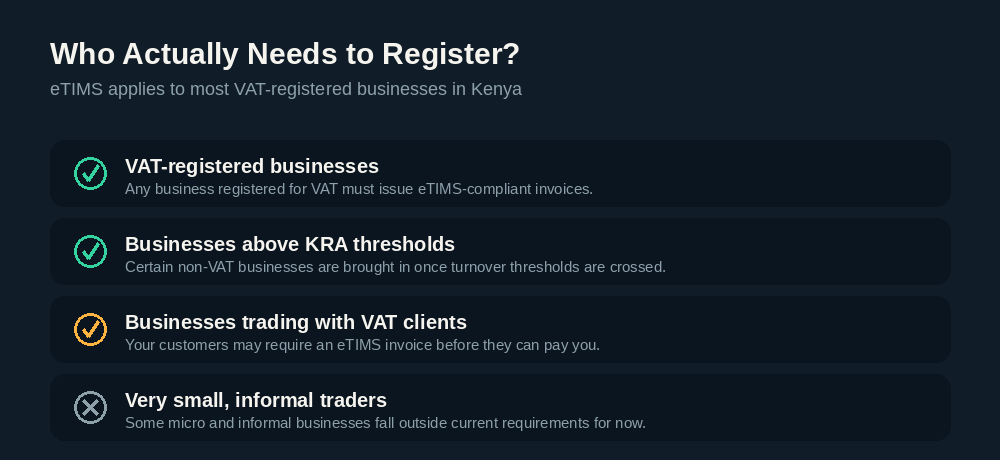
To break it down simply:
- VAT registered businesses must issue eTIMS compliant invoices for their sales. This is the core requirement and applies broadly.
- Businesses that cross certain KRA turnover thresholds may be required to comply even if they are not formally VAT registered yet.
- Businesses that trade with VAT registered clients often find themselves needing eTIMS anyway, because their customers require an eTIMS invoice before releasing payment.
- Very small or informal traders may currently fall outside the requirement, though KRA's rollout has been expanding steadily, so this is worth checking rather than assuming.
If you are unsure which category your business falls into, that uncertainty alone is worth resolving quickly. A short consultation is usually enough to get a clear answer.
eTIMS and TIMS Are Related, But Not the Same Thing
We have covered this in more detail in a separate article, but it is worth a quick mention here. TIMS, or Tax Invoice Management System, was KRA's original system built around fiscal devices such as ETRs. eTIMS extends that idea but removes the strict requirement for a dedicated physical device in many cases, allowing invoices to be generated and submitted electronically straight from software. Depending on your business type, you may need one, the other, or both working together.
How eTIMS Integration Actually Works, Step by Step
This is where a lot of the confusion tends to live, so let's walk through the process in order.
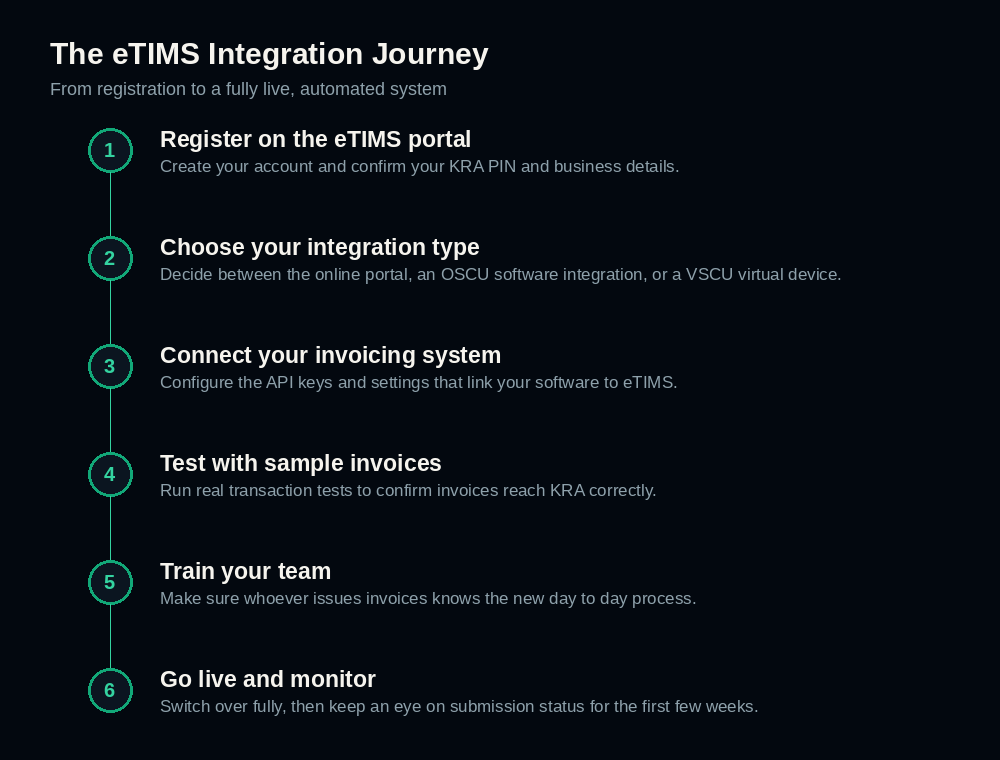
Step one is registration. You create an account on the eTIMS portal and confirm your business details and KRA PIN. This is the administrative starting point, and it needs to be done correctly before anything else can proceed.
Step two is choosing your integration type. There are a few different ways to connect to eTIMS, which we will cover in detail in the next section. The right choice depends heavily on how many invoices your business issues and what systems you already use.
Step three is connecting your invoicing system. If you are integrating software directly, this involves configuring API keys and settings so your point of sale or accounting system can talk to eTIMS automatically.
Step four is testing. Before going live, it is important to run real transaction tests to confirm invoices are actually reaching KRA and being processed correctly. Skipping this step is one of the most common reasons businesses run into problems later.
Step five is training your team. Whoever issues invoices day to day needs to understand how the new process works. A technically correct setup does not help much if the people using it are unsure what to do.
Step six is going live and monitoring. Once everything is tested and your team is comfortable, you switch over fully. It is worth paying close attention to submission status for the first few weeks, since this is when small configuration issues tend to surface if they exist.
The Three Main Ways to Connect
Not every business connects to eTIMS the same way, and understanding the options helps you make a more informed choice.
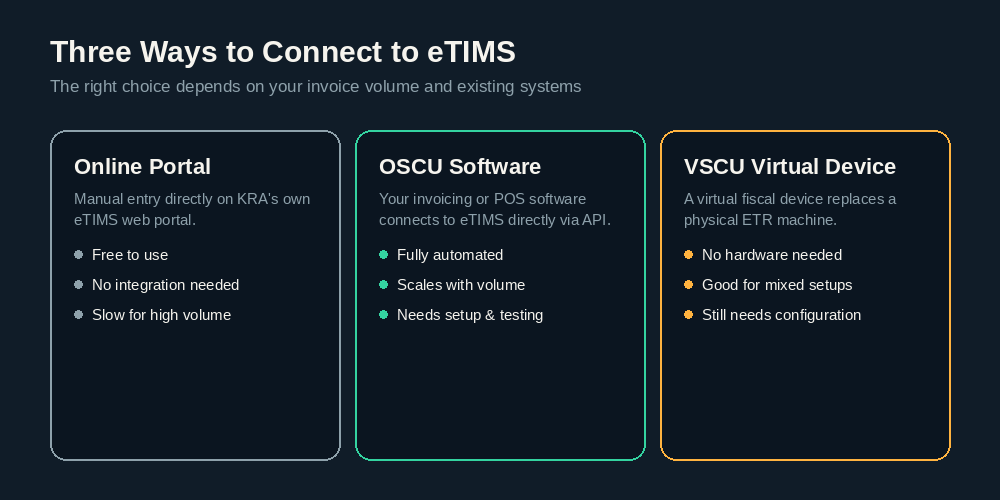
The online portal is KRA's own web based system, where invoices can be entered manually. It costs nothing extra to use and requires no integration work, but it is genuinely slow if your business issues more than a handful of invoices a day. For a very small operation, it may be enough. For anything beyond that, it becomes a bottleneck fast.
OSCU software integration connects your existing invoicing, accounting, or point of sale software directly to eTIMS through an API. This is fully automated once it is set up, and it scales well regardless of how many invoices you issue. The tradeoff is that it requires proper setup and testing, which is exactly the kind of work worth getting right the first time rather than troubleshooting later.
VSCU virtual devices act as a virtual fiscal device, replacing what used to require a physical ETR machine. This suits businesses that want the reliability of a dedicated fiscal device approach without the hardware, and it works well for businesses with mixed or evolving setups. Like OSCU integration, it still requires proper configuration.
For most growing businesses, software integration through OSCU tends to be the most practical long term choice, simply because it removes manual work entirely rather than shifting it somewhere else.
What Happens If a Business Does Not Comply
It is worth being direct about this part. Non compliance with eTIMS requirements is not a minor administrative gap. It can result in financial penalties, and in some cases, it can affect a business's tax compliance certificate, which many other businesses and government processes require as proof of good standing.
There is also a quieter, more immediate cost that often gets overlooked. If your business is not eTIMS compliant, other VAT registered businesses may be unable or unwilling to pay your invoices, since they need an eTIMS compliant invoice on their own end to claim input VAT. In practice, this means non compliance can start affecting cash flow and business relationships well before KRA takes any formal action.
Common Mistakes Worth Avoiding
We have written a full article on this topic, but a few points are worth repeating here because they come up so often. Businesses frequently stay on manual invoicing far longer than necessary, ignore rejected or delayed invoices instead of investigating why they failed, and rely on accounting software that was never properly connected to eTIMS in the first place. Each of these is fixable, usually faster than business owners expect once they actually address it.
Getting Started the Right Way
If there is one takeaway from this guide, it is that eTIMS integration is very manageable when it is approached properly, and genuinely frustrating when it is not. The businesses that struggle most are usually the ones trying to piece it together without guidance, using KRA's documentation alone and hoping for the best.
A proper setup, done once and done correctly, tends to take a matter of days rather than weeks. If your business is still unsure where it stands, or you have started the process and hit a wall, a short consultation is usually enough to map out exactly what is needed and how quickly it can be resolved.
More on Compliance
Kenyan Payroll Compliance Explained: PAYE, NSSF, SHIF, and Housing Levy
A plain-language breakdown of the four statutory deductions on every Kenyan payslip, and why manual payroll is one of the easiest places for a small mistake to become a costly one.
Best Business Software for Kenyan SMEs in 2026
ERP, POS, HR, payroll, and CRM software all solve real problems for a growing Kenyan business. Here is what to actually look for before you choose any of them.
Common eTIMS Mistakes Kenyan Businesses Make (And How to Fix Them)
Five eTIMS mistakes we see again and again in Kenyan businesses, and exactly what fixing each one actually looks like in practice.
Have a question about your own compliance setup?
Ask on WhatsApp